Register Apps for Verification
App developers can register their Trusted Execution Environment (TEE) workloads with the Blacklight network to have them continuously verified. This provides accountability and trust for your applications by ensuring they run correctly within secure enclaves.
Supported Platforms
Blacklight currently verifies workloads running on:
- nilCC (Nillion's Confidential Compute) - Nillion's TEE compute infrastructure
- Phala Network - Phala TEE workloads registered with Blacklight
Prerequisites
- Basic knowledge of Docker
- nilCC
- Phala
nilCC is Nillion's Confidential Compute platform. To register a nilCC workload for verification:
-
Deploy your workload — You will be following the nilCC Quickstart to deploy your workload on nilCC with the addition of steps 2 & 3 below. You'll be using the Developer Portal.
-
Enable continuous verification — In the Create Workload flow, turn on the Heartbeat toggle for your workload. This allows the Blacklight network to continuously verify that your workload is running correctly inside a trusted execution environment.
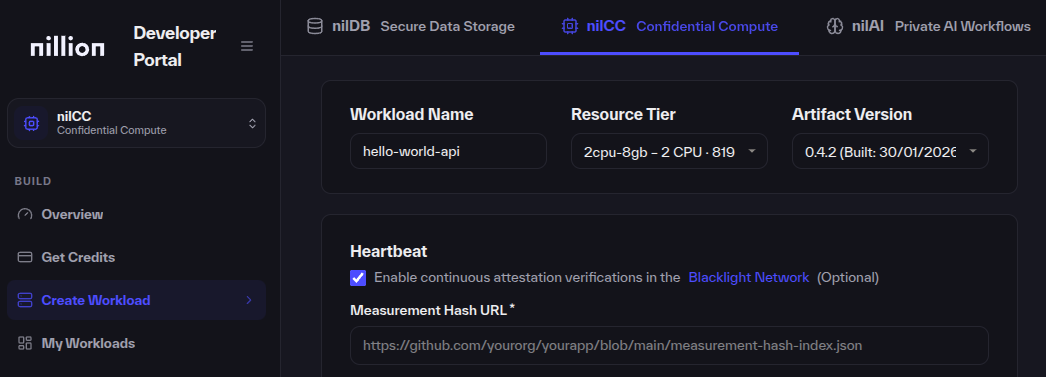
- Provide a Measurement Hash URL — You must expose a public file that has the expected measurement hash for your workload. It will be compared against the attestation report generated by nilCC. The file should be reachable at a stable URL (e.g. on GitHub or your own host). You can reference this example.
After your workload is deployed, it will automatically and periodically be verified on the Blacklight Network.
Phala is a TEE platform that allows you to run workloads in a TEE.
To register a Phala workload for verification, you need to run a Phala Confidential Virtual Machine (CVM) app which exposes /attestation and /info endpoints, then register it with Blacklight.
Endpoint Requirements
Your Phala CVM app must expose two endpoints:
- /attestation
- /info
/attestation (or /api/attestation for Next.js)
Returns TEE attestation quote for cryptographic verification.
Response format:
{
  "quote": "0x...",
  "event_log": "...",
  "replayRtmrs": ["...", "..."],
  "vm_config": "..."
}
/info (or /api/info for Next.js)
Returns TEE environment information.
Response format:
{
  "app_id": "...",
  "instance_id": "...",
  "app_cert": "...",
  "tcb_info": {
    "mrtd": "...",
    "rtmr0": "...",
    "rtmr1": "...",
    "rtmr2": "...",
    "rtmr3": "..."
  },
  "compose_hash": "...",
  "device_id": "..."
}
Implementation Example
- Next.js (TypeScript)
- Python (FastAPI)
This is based off of a Next.js app/api router repo.
npm install @phala/dstack-sdk
next.config.ts
Enable standalone output:
const nextConfig: NextConfig = { output: 'standalone' };
src/app/api/attestation/route.ts:
import { NextResponse } from 'next/server';
import { DstackClient } from '@phala/dstack-sdk';
import crypto from 'crypto';

const endpoint = process.env.DSTACK_SIMULATOR_ENDPOINT || '/var/run/dstack.sock';

export async function GET() {
  const client = new DstackClient(endpoint);
  const result = await client.getQuote(crypto.randomBytes(32));
  return NextResponse.json({
    quote: result.quote,
    event_log: result.event_log,
    replayRtmrs: result.replayRtmrs(),
    vm_config: result.vm_config,
  });
}
src/app/api/info/route.ts:
import { NextResponse } from 'next/server';
import { DstackClient } from '@phala/dstack-sdk';

const endpoint = process.env.DSTACK_SIMULATOR_ENDPOINT || '/var/run/dstack.sock';

export async function GET() {
  const client = new DstackClient(endpoint);
  return NextResponse.json(await client.info());
}
Dockerfile
ENV HOSTNAME=0.0.0.0 # Required for container networking
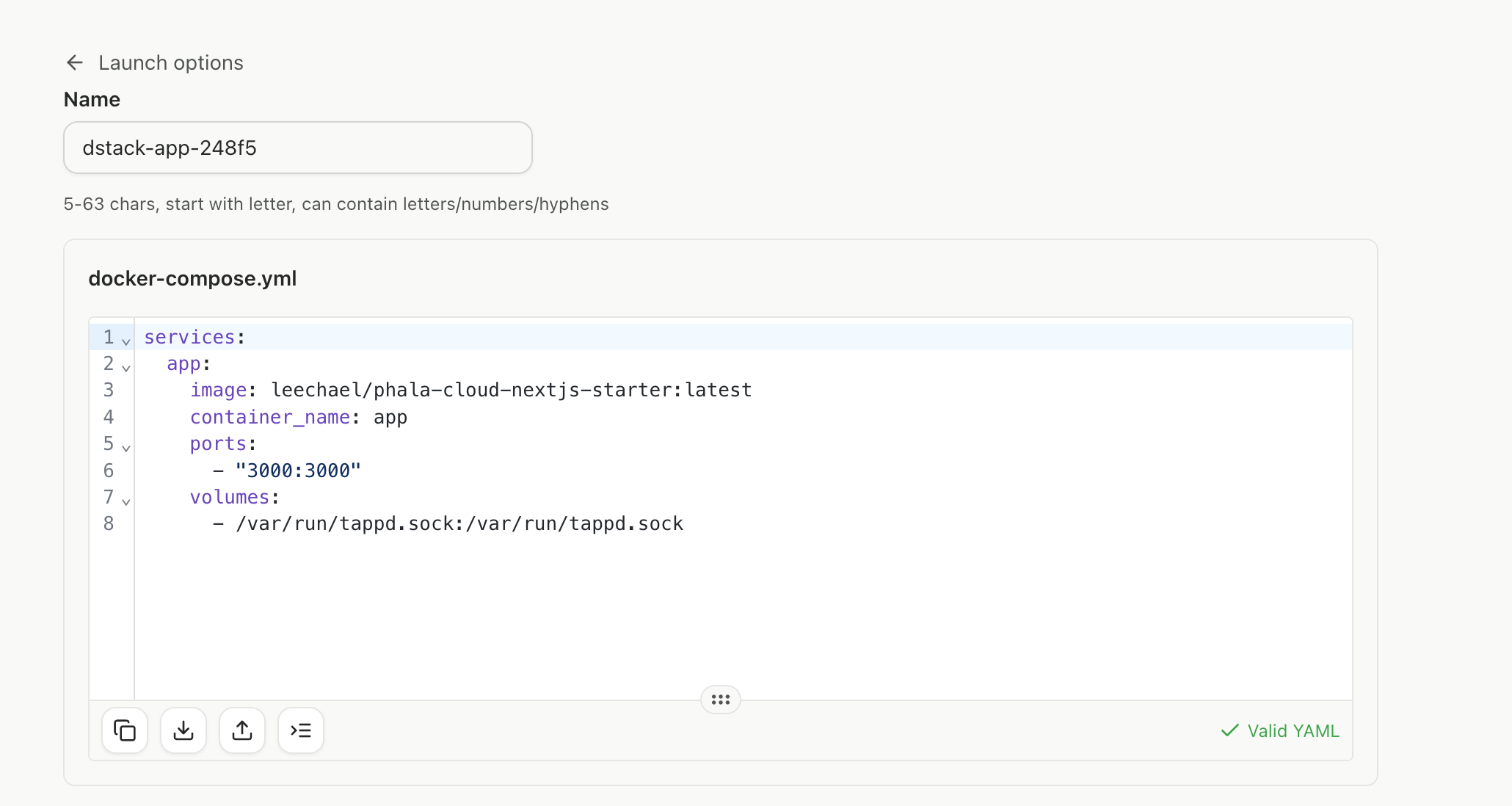
docker-compose.yml (for Phala Cloud):
services:
  app:
    image: your-username/your-app@sha256:YOUR_DIGEST
    ports:
      - 3000:3000
    volumes:
      - /var/run/dstack.sock:/var/run/dstack.sock
Build for Phala Cloud (x86_64 required):
docker build --platform linux/amd64 -t your-username/your-app .
docker push your-username/your-app
This is built off a FastAPI application.
pip install dstack-sdk fastapi uvicorn
main.py:
from fastapi import FastAPI
from dstack_sdk import DstackClient

app = FastAPI()

@app.get("/attestation")
async def attestation():
    result = DstackClient().get_quote()
    return {"quote": result.quote, "event_log": result.event_log, "vm_config": result.vm_config}

@app.get("/info")
async def info():
    return DstackClient().info()
docker-compose.yml (for Phala Cloud):
services:
  app:
    image: your-username/your-app@sha256:YOUR_DIGEST
    ports:
      - 8000:8000
    volumes:
      - /var/run/dstack.sock:/var/run/dstack.sock
Build for Phala Cloud (x86_64 required):
docker build --platform linux/amd64 -t your-username/your-app .
docker push your-username/your-app
Deployment
- Sign up at cloud.phala.com
- Deploy a new CVM + replace your tagged
docker-compose.yml
- Get your endpoint URL from
View Details→Networktab →Endpoint #1 - Verify endpoints work:
curl https://YOUR-ENDPOINT.phala.network/api/info
curl https://YOUR-ENDPOINT.phala.network/api/attestation
- Register with Blacklight using your endpoint URL
//TODO: ADD URL
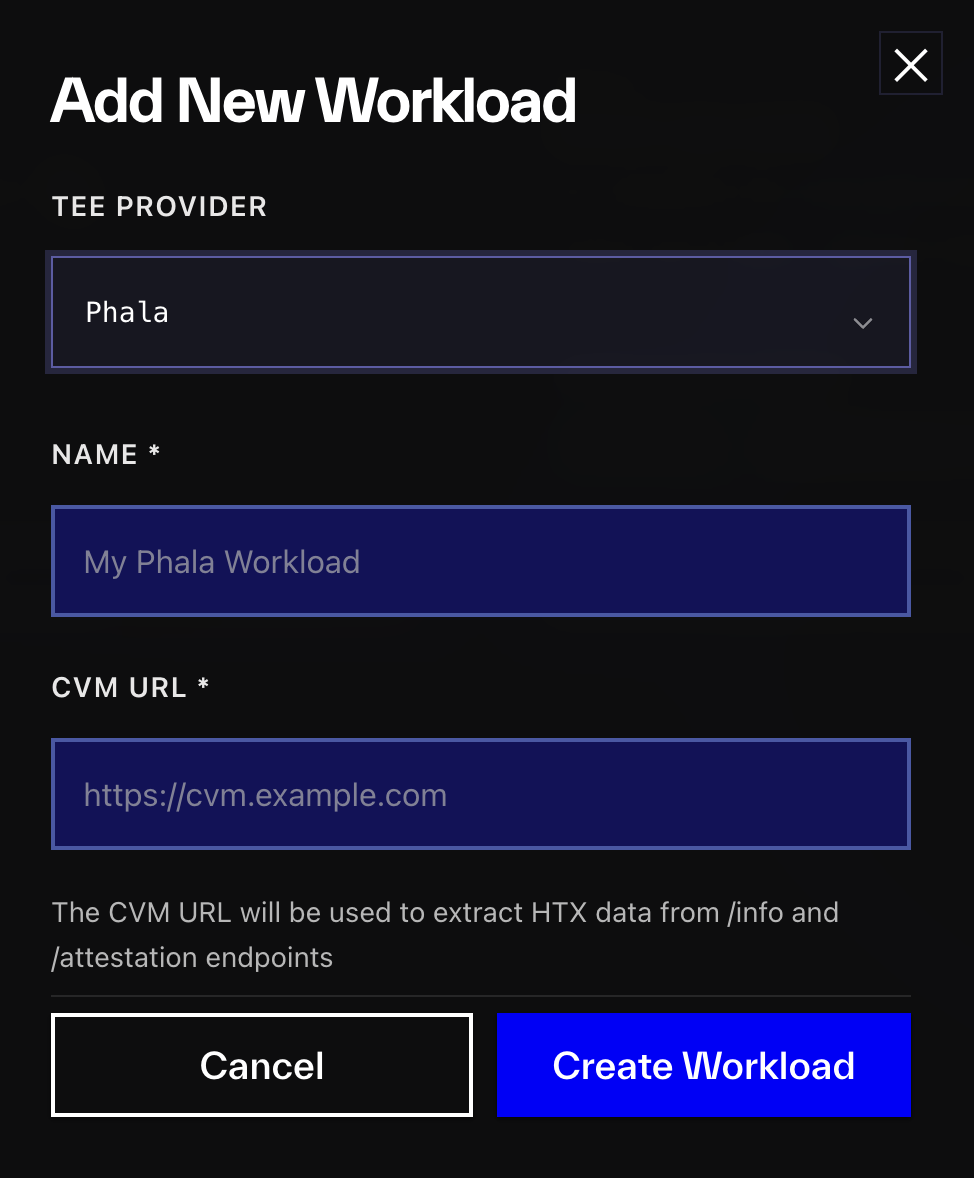
Great job, now the Blacklight network will be able to continuously verify this workload!
If you get stuck, here are some common troubleshooting fixes for Phala.